iOS 15 - Top 10 features
The brand new operating system for the Apple device just hit the devices on September 20, 2021. The new iOS 15 comes with lots of features that are listed on their official website.
Here in this article, we will look into the top 10 features of the iOS 15.
1. Cross-platform FaceTime
The much-awaited cross-platform face time just arrived on the Apple devices with iOS 15. Now with this feature, both android users and PC users can join FaceTime. However, an Apple device is required to initiate a FaceTime call.
The Apple device owner has to open their FaceTime app and select the create link option to create a FaceTime room. The room can now have both android and PC users. It is also possible to create a link while you a call is already in progress.

2. On-device Siri
Siri will process all the requests on the device itself instead of kicking the commands to the Apple server from now onwards. This feature will make Siri more secure and fast.
Siri will use the data stored in your device to understand a user better in types of content they like, the topics the user prefers, and try to understand a user better. So overall, Siri will improve itself over time for every user.
The on-device Siri is available through a neural engine and is available on the device that comes with Apple's A12 Bionic chip or later.

3. Notification summary
Generally, the number of Apps installed on our phones is increasing day by day, increasing the number of notifications, many of which are irrelevant.
With a notification summary, a user can set a specific time for unimportant notifications and prevent interruptions all day long. Important notification, however, can bypass the notification summary, whereas notification lies Instagram likes, news alerts are paused.

4. Find device
With the new iOS 15, the Find device feature is now even more robust. The device can be located even if the device is turned off or erased, making it hard for thieves to hide the device.
The device can be located whenever it comes close to another active device. Now the device can be located even if the phone has been erased, which was not in the previous version of iOS.
The feature is turned on by default on Apple devices, but if you want to cross-check, it will find my iPhone under the profile section and toggling the "Find my network" option.

5. System-wide translation
From iOS 15 onwards, the translation will be system-wide, which means a user can now select text from anywhere on the device and translate it from one language to another language.
The available languages are Arabic, Chinese, English(UK, US), French, German, Italian, Japanese, Korean, Portuguese, Russian, and Spanish.

6. Live Text
From now onwards, the phone camera will recognize any texts while capturing a photo. Whenever the camera recognizes any texts, a three-dot menu will occur. Tapping those dots will allow a user to tea notes and other functions, including web searches.
The tool comes in handy when taking notes, taking addresses of restaurants, or other records.

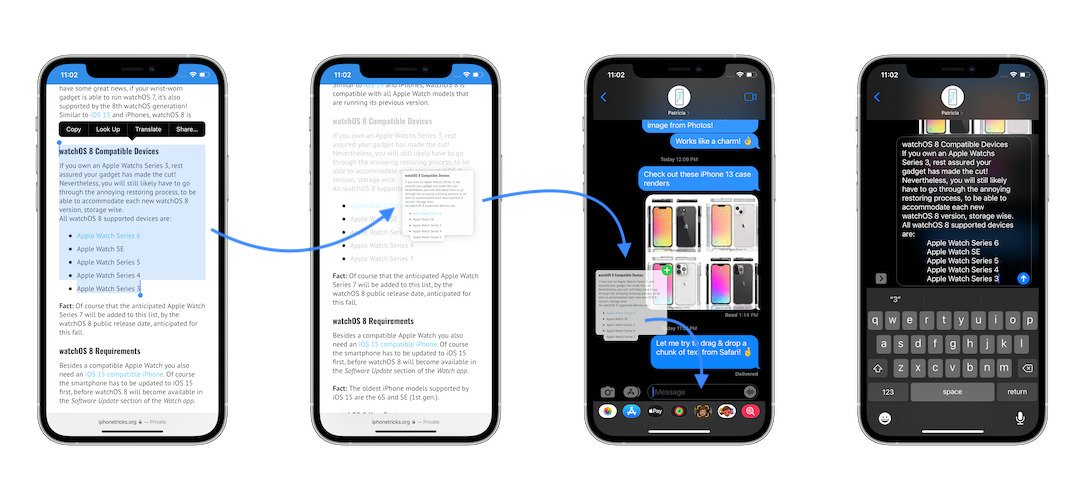
7. Drag and Drop - texts, images, files
iOS 15 allows a cross-app drag and drop feature. Now a user can drag and drop anything, including texts, links, images, files, and many other types of files. This feature also comes with "stacking," which means a user can drag and drop multiple items simultaneously.
8. Tab groups
The default web browser in Apple, safari, evolved a lot in the past few years. The main talk of the town about the safari was upon its revamped design. While talking about the design, most of us just unnoticed a prominent utility feature, the "Tab grouping."
As the name suggests, the feature allows users to group tabs in a folder to access them later. The feature comes in handy as users want to group their tabs based on their interests, such as travel, office, sports, and others.
To access this, users need to open their browser and change the tab view to tile, and long-pressing over the tabs allows users to group the posts to a folder and name them. One of the great features about iOS 15 is that the folder syncs in the whole Apple ecosystem mean a user can access the grouped tabs in their mac even if they created the folder on their iPhone or iPad.

9. Built-in Authenticator
We can not imagine an iOS update without a security feature. iOS 15 comes up with a built-in authenticator. Built-in authenticator allows users to save two-factor verification code right alongside the username and password. So now, users do not need Google authenticator or Microsoft authenticator for two-factor authentication.
To set up, a user needs a setup key or QR code. Once added user can get code from the authenticator to log in to a website. However, logging in to safari auto-fills the code, which sounds convenient.

10. Health App Trends
The health app now has a "Trends" section. This trend checks the trends of a user about the changes in exercise, oxygen level, heart rate. Users can also set to get notified about the change in trends. This also allows user to share their stats with their family and friends.

Which of the feature you are most excited about. Comment below your favourite feature.


Comments
Post a Comment